Activity logs for organizations in Workbench
Categories:
Prior reading: Manage organizations
Purpose: This document explains what activity logs are and how you can use them to gain insight about your organizations.
Introduction
Verily Workbench activity logs are time-stamped logs that can associate a user ID, org ID, operation taken (e.g., create, clone, delete, update access), and a Workbench object (e.g., workspace, data collection, storage resource, VM, Dataproc cluster).
These logs are useful to Organization Admins who want to better understand how active their organization's users are in Workbench. With these logs, admins can write SQL queries to pull results that answer queries such as:
- How many users are in this org?
- How many workspaces have users in this org created?
- How many cloud apps (i.e., notebooks) have users in this org created?
Access the activity logs
Activity logs are accessible at the data collection and organization levels.
For organizations, Org Admins will see a link to these logs, stored in BigQuery, from the Organizations page in the Workbench web UI:
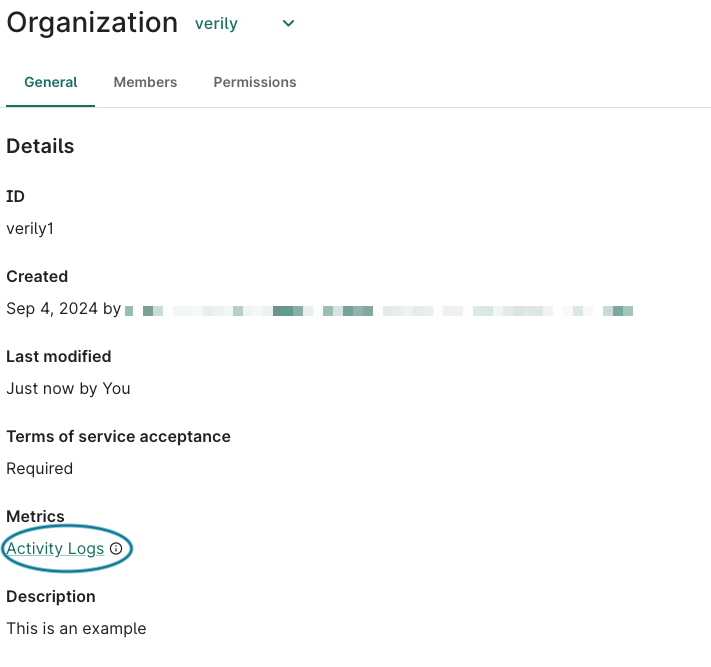
Click the Activity Logs link to open these logs in the BigQuery UI. The logs are stored in BigQuery tables that are separated by organization ID.
Using BigQuery, Org Admins can review the schema and directly query the tables via SQL, save query results or open them in Google Sheets, and more.
Understand table naming with org_id suffix
Each table in the activity logs dataset is separated by organization ID using a table suffix. The
table naming pattern is <table_name>_<org_id>. For example, if your organization ID is abc123,
the workspace activity logs table would be named:
`workbench-bq-log-sink.workbench_monitoring_org_logs_prod.wsm_workspace_activity_logs_abc123`
You can find your organization's user-facing ID in the URL when viewing your organization:
https://workbench.verily.com/organizations/{your-organization-user-facing-id}
If you're an admin for multiple organizations, you'll need to query each organization's table separately.
Note
If you're having issues running SQL queries from any Workbench GCP project, please reach out to workbench-support@verily.com, as we may need to allowlist your email domain. If the data collection you're in disallows you from running BigQuery, you can also run the query in your personal GCP project. Alternatively, as a workaround, you can run your queries from a Workbench notebook app, as described below.Be aware
Previewing or browsing tables is not available for these datasets because data is isolated into separate tables per organization. However, you can achieve the same by running a query on your specific organization's table:
SELECT * FROM `workbench-bq-log-sink.workbench_monitoring_org_logs_prod.wsm_workspace_activity_logs_<org_id>` LIMIT 10
Schemas of the activity logs tables
To see CRUD (Create, Read, Update, Delete) activity, query the
workbench-bq-log-sink.workbench_monitoring_org_logs_prod.wsm_workspace_activity_logs_<org_id>
tables:
| Field name | Type | Definition |
|---|---|---|
| workspace_id | STRING | Universally unique identifier (UUID) for the workspace |
| workspace_user_facing_id | STRING | Human-readable, user-facing ID for the workspace |
| change_date | TIMESTAMP | Timestamp of change event |
| actor_email | STRING | The actor email |
| user_id | STRING | UUID of the user |
| change_subject_id | STRING | UUID of the Workbench resources (e.g. VM, GCS bucket, workspace itself) that was changed |
| change_subject_type | STRING | Type of the changed resources |
| source_workspace_id | STRING | UUID of the workspace from which this workspace is cloned. NULL if this is not a duplication. |
| org_id | STRING | UUID of the organization |
| org_user_facing_id | STRING | Human-readable, user-facing ID for the organization |
| pod_id | UUID | UUID of the pod |
| pod_user_facing_id | STRING | Human-readable, user-facing ID for the pod |
| is_data_collection | BOOLEAN | Whether this is a data collection |
To see basic workspace properties, query the
workbench-bq-log-sink.workbench_monitoring_org_logs_prod.wsm_workspaces_<org_id> tables:
| Field name | Type | Definition |
|---|---|---|
| workspace_id | STRING | Universally unique identifier (UUID) for the workspace |
| workspace_user_facing_id | STRING | Human-readable, user-facing ID for the workspace |
| workspace_display_name | STRING | User-friendly display name of the workspace |
| description | STRING | Workspace description |
| created_date | TIMESTAMP | The timestamp when workspace was created |
| created_by_email | STRING | Email of workspace creator |
| org_id | STRING | UUID for the organization |
| org_user_facing_id | STRING | Human-readable, user-facing ID for the organization |
| pod_id | UUID | UUID of the pod |
| pod_user_facing_id | STRING | Human-readable, user-facing ID for the pod |
| cloud_platform | STRING | Google Cloud Platform (GCP) or Amazon Web Services (AWS) |
| properties | STRING | JSON string of metadata on the workspace |
| workspace_metadata_policy | STRING | JSON string list of completed metadata policies |
| gcp_project_id | STRING | GCP project ID (for GCP workspaces) |
| gcp_project_number | STRING | GCP project number (for GCP workspaces) |
| is_data_collection | BOOLEAN | Whether this is a data collection |
To see workspace resources (e.g., apps, buckets, datasets), query the
workbench-bq-log-sink.workbench_monitoring_org_logs_prod.wsm_resources_<org_id> tables:
| Field name | Type | Definition |
|---|---|---|
| workspace_id | STRING | Universally unique identifier (UUID) for the workspace |
| workspace_user_facing_id | STRING | Human-readable, user-facing ID for the workspace |
| resource_id | STRING | Universally unique identifier (UUID) for the resource |
| resource_user_facing_id | STRING | Human-readable, user-facing ID for the resource |
| resource_display_name | STRING | User-friendly display name for the resource |
| description | STRING | Resource description |
| created_date | TIMESTAMP | The timestamp when the resource was created |
| created_by_email | STRING | Email of resource creator |
| resource_type | STRING | Type of resources |
| exact_resource_type | STRING | Type of resource, used when needing to distinguish CONTROLLED and REFERENCED resources |
| resource_lineage | STRING | Where the resource is from, e.g., the data collection ID where it's imported from |
| state | STRING | Lifecycle state of the resource |
| org_id | STRING | UUID for the organization |
| org_user_facing_id | STRING | Human-readable, user-facing ID for the organization |
| pod_id | UUID | UUID of the pod |
| pod_user_facing_id | STRING | Human-readable, user-facing ID for the pod |
| is_data_collection | BOOLEAN | Whether this resource is in a data collection |
To get a list of workspace roles, query the
workbench-bq-log-sink.workbench_monitoring_org_logs_prod.sam_workspace_users_<org_id> tables:
| Field name | Type | Definition |
|---|---|---|
| user_email | STRING | Email of the user |
| org_id | STRING | UUID for the organization |
| workspace_id | STRING | Universally unique identifier (UUID) for the workspace |
| role | STRING | Role of the user in the workspace (owner, reader, or writer) |
For user information (e.g., user email, orgs, active states), query the
workbench-bq-log-sink.workbench_monitoring_org_logs_prod.um_users_<org_id> tables:
| Field name | Type | Definition |
|---|---|---|
| user_id | STRING | Universally unique identifier (UUID) of the user |
| STRING | User email | |
| org_id | STRING | UUID of the organization |
| org_user_facing_id | STRING | Human-readable, user-facing ID for the organization |
| active_state | STRING | The current user state (ENABLED, DISABLED, ARCHIVED, INVITED) |
| tos_state | STRING | Whether the user has accepted Terms of Service (TOS_REQUIRED, TOS_OK) |
| created_date | TIMESTAMP | When the Workbench user account was created |
| created_by_email | STRING | Email of user who created the user's account. |
| last_updated_date | TIMESTAMP | Last time the user's status, profile, or other metadata was updated. |
| last_updated_by_email | STRING | Email of user who last updated the user |
For pod information (e.g., pod name, org, billing account), query the
workbench-bq-log-sink.workbench_monitoring_org_logs_prod.um_pods_<org_id> tables:
| Field name | Type | Definition |
|---|---|---|
| pod_id | STRING | UUID of the pod |
| pod_user_facing_id | STRING | Human-readable, user-facing ID for the pod |
| description | STRING | Description for the pod |
| org_id | STRING | UUID of the organization |
| org_user_facing_id | STRING | Human readable, user-facing ID for the organization |
| org_display_name | STRING | Organization display name |
| environment_type | STRING | The cloud environment this POD supports (AWS, GCP) |
| billing_account_id | STRING | Cloud billing account ID (GCP only) |
| created_date | TIMESTAMP | When the Workbench user account was created |
| created_by_email | STRING | Email of user who created the user's account. |
| last_updated_date | TIMESTAMP | Last time the user's status, profile, or other metadata is updated. |
| last_updated_by_email | STRING | Email of user who last updated the user |
For a list of pods and their users, query the
workbench-bq-log-sink.workbench_monitoring_org_logs_prod.um_user_pod_roles_<org_id> tables:
| Field name | Type | Definition |
|---|---|---|
| user_email | STRING | User email |
| policy_group | STRING | Google Group for the pod role |
| role | STRING | User's role on the pod |
| pod_id | STRING | UUID of the pod |
| pod_user_facing_id | STRING | Human-readable, user-facing ID for the pod |
| description | STRING | Description for the pod |
| org_id | STRING | UUID of the organization |
| org_user_facing_id | STRING | Human-readable, user-facing ID for the organization |
| environment_type | STRING | The cloud environment this pod supports (AWS, GCP) |
| created_date | TIMESTAMP | When the pod was created |
| created_by_email | STRING | Email of pod creator |
| last_updated_date | TIMESTAMP | Last time the pod was updated. |
| last_updated_by_email | STRING | Email of user who last updated the pod |
To view information for changes made to Workbench groups (e.g., names, ownership, change
history), query the
workbench-bq-log-sink.workbench_monitoring_org_logs_prod.um_workbench_groups_<org_id> tables:
| Field name | Type | Definition |
|---|---|---|
| internal_name | STRING | Internal name of the Workbench group |
| group_name | STRING | Name of the Workbench group |
| org_id | STRING | UUID of the organization |
| org_user_facing_id | STRING | Human-readable, user-facing ID for organization |
| org_display_name | STRING | Display name of the organization |
| created_date | TIMESTAMP | Timestamp of when the Workbench group was created |
| created_by | STRING | The user who created the Workbench group |
| last_updated_date | TIMESTAMP | Timestamp of when the Workbench group was last updated |
| last_updated_by | STRING | The user who last updated the Workbench group |
To view user activity changes in an organization, query the
workbench-bq-log-sink.workbench_monitoring_org_logs_prod.um_user_activity_in_org_log_<org_id>
tables:
| Field name | Type | Definition |
|---|---|---|
| change_timestamp | TIMESTAMP | Timestamp of change event |
| change_type | STRING | Type of change action |
| subject_type | STRING | The type being changed (GROUP, POD, or ORGANIZATION) |
| subject_id | STRING | ID of the subject |
| actor_email | STRING | The actor email |
| properties | STRING | Information about the change itself |
| related_resources | STRING | Information about the user the change event applied to |
| org_id | STRING | UUID of the organization |
| org_user_facing_id | STRING | Human-readable, user-facing ID for organization |
Schema of the audit activity logs tables
To view audit logs for workspace-level activities, query the
workbench-bq-log-sink.workbench_cloud_audit_logs_prod.cloud_audit_logs_<org_id> tables:
| Field name | Type | Definition |
|---|---|---|
| insert_id | STRING | Unique identifier for each audit log entry (used for deduplication) |
| timestamp | TIMESTAMP | Timestamp of when the event occurred |
| org_id | STRING | UUID of the organization |
| org_user_facing_id | STRING | Human-readable, user-facing ID for the organization |
| workspace_id | STRING | UUID of the workspace |
| workspace_user_facing_id | STRING | Human-readable, user-facing ID for the workspace |
| gcp_project_id | STRING | GCP project ID (for GCP workspaces) |
| gcp_project_number | STRING | GCP project number (for GCP workspaces) |
| user_email | STRING | The end user's email address |
| audit_log | STRING | The full audit log payload as JSON |
Note
The workbench_cloud_audit_logs_prod dataset contains cloud
audit logs that provide detailed tracking of Google Cloud Storage (GCS) and BigQuery operations
performed within your organization's workspaces. This is separate from the activity logs in
workbench_monitoring_org_logs_prod, which track workspace-level activities.
Data retention: Cloud audit logs are retained for 2 years (730 days) before being
automatically deleted. Logs are partitioned by the timestamp field for efficient querying.
Query the activity logs tables
Note
For all of the queries below, replace<org_id> with your
organization's user-facing ID.
BigQuery UI
You can query the activity logs table directly from the BigQuery panel in the Google Cloud console by clicking the Activity logs link from a data collection that you own.
Run queries from a Workbench app
You can also query the table from within a Workbench app using the bigquery library, as
shown below:
import pandas as pd
from google.cloud import bigquery

BQ_dataset = 'workbench-bq-log-sink.workbench_monitoring_org_logs_prod'

job_query_config = bigquery.QueryJobConfig(default_dataset=BQ_dataset)
client = bigquery.Client(default_query_job_config=job_query_config)
Next, define a query on the table:
query = """
SELECT DISTINCT(workspace_user_facing_id), workspace_id, pod_user_facing_id, is_data_collection
FROM `wsm_workspace_activity_logs_<org_id>`
ORDER BY change_date DESC
"""
Then, run the query and view a dataframe of the results:
df = client.query(query).result().to_dataframe()
df
Query a specific data collection
If you're an owner of multiple data collections, the logs are aggregated in one table. So if you're
interested in the usage of a particular data collection, you can first get the user-facing ID of
that data collection, and then refine your query to retrieve data for just that data collection. You
can find the user-facing ID in the path of the data collection URL like this:
https://workbench.verily.com/data-collections/{your-data-collection-user-facing-id}
Basic example queries
"How many users are in my org?"
SELECT COUNT(user_id)
FROM `workbench-bq-log-sink.workbench_monitoring_org_logs_prod.um_users_<org_id>`
"How many pods are in my org?"
SELECT COUNT(pod_id)
FROM `workbench-bq-log-sink.workbench_monitoring_org_logs_prod.um_user_pod_roles_<org_id>`
"How many workspaces are in my org?"
SELECT COUNT(workspace_id)
FROM `workbench-bq-log-sink.workbench_monitoring_org_logs_prod.wsm_workspaces_<org_id>`
"How many cloud apps (i.e., notebooks) have users in this org created?"
SELECT COUNT(resource_id)
FROM `workbench-bq-log-sink.workbench_monitoring_org_logs_prod.wsm_resources_<org_id>`
WHERE resource_type IN ('AWS_EC2_INSTANCE', 'AWS_SAGEMAKER_NOTEBOOK', 'AI_NOTEBOOK_INSTANCE', 'DATAPROC_CLUSTER', 'GCE_INSTANCE')
Query activity logs tables to see organization and group changes
"How can I see users added to or removed from an organization, along with their role levels?"
WITH parsed_logs AS (
    SELECT
        l.change_timestamp,
        l.change_type,
        l.org_user_facing_id,
        l.subject_id,
        JSON_EXTRACT_SCALAR(l.properties, '$.role') AS role,
        JSON_EXTRACT_SCALAR(l.properties, '$.reason') AS reason_for_change,
        l.actor_email,
        l.related_resources
    FROM workbench-bq-log-sink.workbench_monitoring_org_logs_prod.um_user_activity_in_org_log_<orgname> l
    WHERE l.change_timestamp >= '2026-03-02T00:00:00Z'
      AND l.change_timestamp < '2026-03-10T00:00:00Z'
      AND l.subject_type = 'ORGANIZATION'
  ),
  extracted_users AS (
    SELECT *,
        JSON_EXTRACT_SCALAR(resource, '$.resourceId') AS user_affected,
        ROW_NUMBER() OVER (PARTITION BY change_timestamp, change_type, subject_id ORDER BY resource) as rn
    FROM parsed_logs,
    UNNEST(JSON_EXTRACT_ARRAY(related_resources)) AS resource
    WHERE JSON_EXTRACT_SCALAR(resource, '$.resourceType') = 'PRINCIPAL'
  )
  SELECT change_timestamp, change_type AS action, org_user_facing_id AS org_name,
         subject_id AS org_uuid, user_affected, role AS role_level,
         actor_email AS admin_who_acted, reason_for_change
  FROM extracted_users
  WHERE rn = 1
  ORDER BY change_timestamp DESC;
"How can I see which users were added to or removed from a Workbench group?"
WITH parsed_logs AS (
        SELECT
        l.change_timestamp,
        l.change_type,
        l.org_user_facing_id,
        l.subject_id,
        JSON_EXTRACT_SCALAR(l.properties, '$.role') AS role,
        JSON_EXTRACT_SCALAR(l.properties, '$.reason') AS reason_for_change,
        l.actor_email,
        l.related_resources
    FROM workbench-bq-log-sink.workbench_monitoring_org_logs_prod.um_user_activity_in_org_log_<orgname> l
    WHERE l.change_timestamp >= '2026-06-17T00:00:00Z'
      AND l.change_timestamp < '2026-06-30T00:00:00Z'
      AND l.subject_type = 'GROUP'
  ),
  extracted_users AS (
    SELECT *,
        JSON_EXTRACT_SCALAR(resource, '$.resourceId') AS user_affected,
        ROW_NUMBER() OVER (PARTITION BY change_timestamp, change_type, subject_id ORDER BY resource) as rn
    FROM parsed_logs,
    UNNEST(JSON_EXTRACT_ARRAY(related_resources)) AS resource
    WHERE JSON_EXTRACT_SCALAR(resource, '$.resourceType') = 'PRINCIPAL'
  )
  SELECT
      e.change_timestamp,
      e.change_type AS action,
      g.internal_name AS group_name,
      e.subject_id AS group_uuid,
      e.user_affected,
      e.role AS role_level,
      e.actor_email AS admin_who_acted,
      e.reason_for_change
  FROM extracted_users e
  LEFT JOIN workbench-bq-log-sink.workbench_monitoring_org_logs_prod.um_workbench_groups_<orgname> g
    ON e.subject_id = g.internal_name
  WHERE e.rn = 1
  ORDER BY e.change_timestamp DESC;
Query comprehensive cloud audit logs
For detailed GCP-level audit logs across your organization, use the
workbench_cloud_audit_logs_prod dataset:
"What are the most recent comprehensive cloud audit logs for my organization?"
SELECT timestamp, workspace_id, user_email, org_id
FROM `workbench-bq-log-sink.workbench_cloud_audit_logs_prod.cloud_audit_logs_<org_id>`
ORDER BY timestamp DESC
LIMIT 50
"What workspaces have the most audit log activity?"
SELECT workspace_id, org_id, COUNT(*) as event_count
FROM `workbench-bq-log-sink.workbench_cloud_audit_logs_prod.cloud_audit_logs_<org_id>`
GROUP BY workspace_id, org_id
ORDER BY event_count DESC
LIMIT 10
"What are the audit logs for a specific workspace?"
SELECT timestamp, user_email, audit_log
FROM `workbench-bq-log-sink.workbench_cloud_audit_logs_prod.cloud_audit_logs_<org_id>`
WHERE workspace_id = 'your-workspace-id'
ORDER BY timestamp DESC
LIMIT 100
"What BigQuery queries were performed?"
SELECT
  timestamp,
  user_email,
  JSON_VALUE(audit_log, '$.methodName') AS method_name,
  JSON_VALUE(audit_log, '$.status.code') AS status_code,
  JSON_VALUE(audit_log, '$.status.message') AS status_message,
  JSON_VALUE(audit_log, '$.servicedata_v1_bigquery.jobInsertRequest.resource.jobConfiguration.query.query') AS query_text
FROM `workbench-bq-log-sink.workbench_cloud_audit_logs_prod.cloud_audit_logs_<org_id>`
WHERE JSON_VALUE(audit_log, '$.serviceName') = 'bigquery.googleapis.com' and JSON_VALUE(audit_log, '$.methodName') ='jobservice.insert'
ORDER BY timestamp DESC
LIMIT 100
"What Google Cloud Storage (GCS) operations were performed?"
SELECT
  timestamp,
  user_email,
  JSON_VALUE(audit_log, '$.methodName') AS method_name,
  JSON_VALUE(audit_log, '$.resourceName') AS resource_name,
  JSON_VALUE(audit_log, '$.status.code') AS status_code,
  JSON_VALUE(audit_log, '$.status.message') AS status_message
FROM `workbench-bq-log-sink.workbench_cloud_audit_logs_prod.cloud_audit_logs_<org_id>`
WHERE JSON_VALUE(audit_log, '$.serviceName') = 'storage.googleapis.com'
ORDER BY timestamp DESC
LIMIT 100
Last Modified: 25 August 2026