Configure external ECR repository resources
Categories:
Purpose: This document covers how to create external ECR repository resources and configure access for them in a Verily Workbench AWS workspace.
Introduction
External Amazon Elastic Container Registry (ECR) repository resources enable AWS workspaces to access ECR repositories located outside of Workbench’s control. They are essential for running workflows and launching private image cloud apps.
Key ECR repository attributes
| Attribute | Required? | Description |
| Account ID | Yes | The non-Workbench managed AWS account where the ECR repository lives. |
| Region | Yes | The AWS Region where the ECR repository lives. This must match the Region of the workspace that will use it. AWS HealthOmics requires a workflow's container images, inputs, and outputs to all be in the same Region as the workflow. |
| Repository name | No | The ECR repository name. |
| Role tag key prefix | No | Prefix for Identity and Access Management (IAM) role tags used to access the repository. See Tags for AWS Identity and Access Management resources and the Grant access section below. |
Note
AWS HealthOmics workflows run in an isolated network with no outbound internet access so container images must be fully self-contained — a task can't reach scripts, binaries, or dependencies outside the image at run time. HealthOmics also enforces a fixed, non-adjustable maximum container image size: 45 GiB for CPU instances and 95 GiB for GPU instances. See HealthOmics fixed size quotas for details.Create an external ECR repository resource
You can use the Workbench CLI to create external ECR repository resources in AWS-backed
workspaces. After setting your workspace via
wb workspace set, run the
wb resource create ecr-external-repository
command:
wb resource create ecr-external-repository \
  --account=000000000000 \
  --description="test external ecr repo" \
  --region="us-east-1" \
  --id="test-external-ecr" \
  --repository-name="test-external-ecr"
Note
Theaccount, region, and repository-name (if provided)
must match an existing ECR repository in your non-Workbench AWS account. If repository-name
is not provided, it will provide access to all repositories within the private registry associated
with the provided account and region parameters.
Grant access
AWS pod account ID
Your Workbench AWS pod is backed by a single AWS account. To view the pod account ID, run
wb pod describe:
wb pod describe --pod=aws --org=verily1
Example output:
ID: aws
Organization: verily1
Description: AWS Pod
Cloud platform: AWS
Discovery role ARN: arn:aws:iam::535002863113:role/v0SaasTerraDiscovery
...
You can find the pod account ID in the Discovery role ARN field. In the example above, the pod
account ID is 535002863113.
Grant cross-account access
To allow Workbench to access your ECR repository, grant cross-account access by attaching resource-based policies to your ECR repository.
The following diagram illustrates Workbench’s access model for provisioning permissions to external resources for HealthOmics workflows:
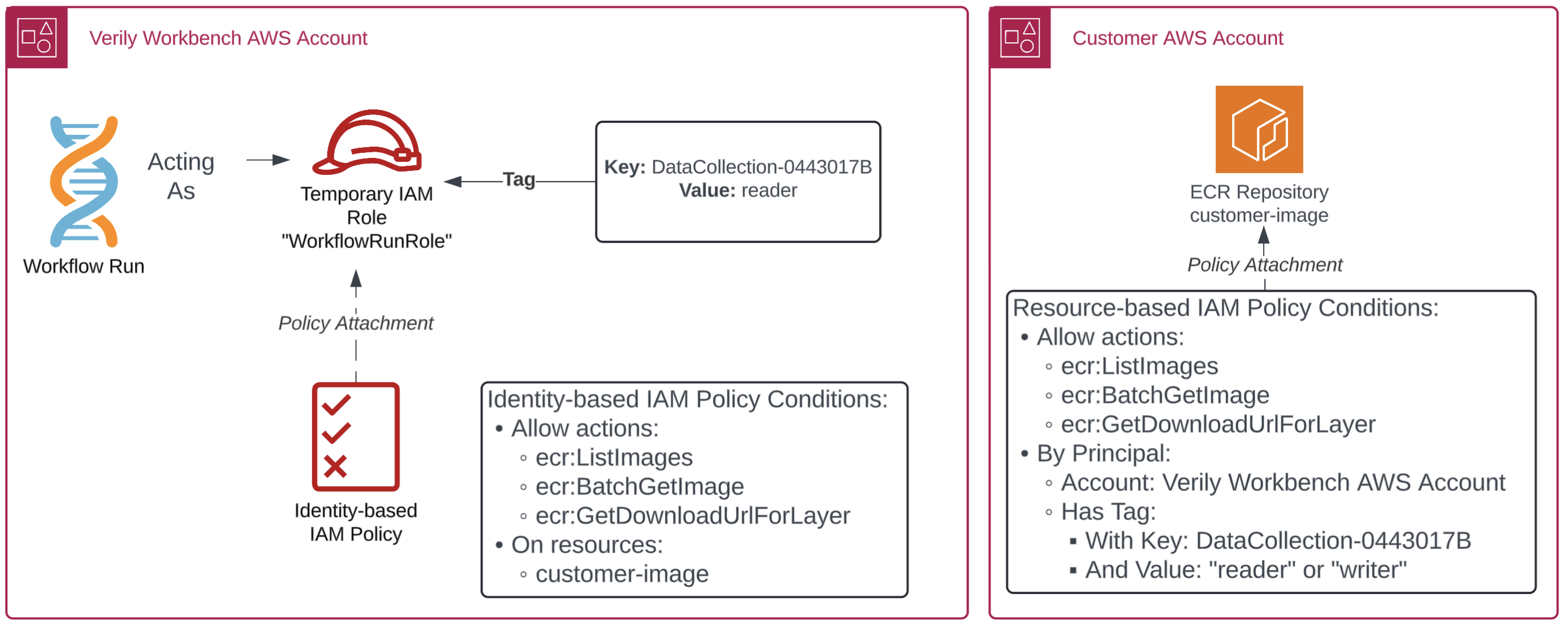
Access model steps:
- Workbench provisions a temporary workflow execution IAM role for each AWS HealthOmics workflow run.
- The role includes a custom tag attribute containing a workspace or data collection UUID and its scope of access.
- Identity-based policies define ECR repository permissions, targeted at the external ECR repo.
- In the external AWS account, an IAM policy is attached to the ECR repository. This grants permissions to the Workbench data plane account, conditioned on the custom attribute tag.
IAM policy configuration
To grant Workbench access to an individual ECR repository, use the following IAM policy
template. Replace <pod-aws-account-id> with the pod account ID from the
AWS pod account ID section above. Replace <workspace-id> with the workspace
UUID containing the external ECR repository resource. This can be retrieved from the output of
wb workspace describe --format=json.
{
  "Version": "2012-10-17",
  "Statement": [
    {
      "Sid": "CrossAccountOmicsExec",
      "Effect": "Allow",
      "Principal": {
        "AWS": "arn:aws:iam::<pod-aws-account-id>:root"
      },
      "Action": [
        "ecr:BatchCheckLayerAvailability",
        "ecr:BatchGetImage",
        "ecr:GetDownloadUrlForLayer"
      ],
      "Condition": {
        "StringEquals": {
          "aws:PrincipalType": "AssumedRole",
          "aws:PrincipalTag/vwb-<workspace-id>": ["reader", "writer"]
        }
      }
    },
    {
      "Sid": "OmicsWorkflow",
      "Effect": "Allow",
      "Principal": {
        "Service": "omics.amazonaws.com"
      },
      "Action": [
        "ecr:BatchCheckLayerAvailability",
        "ecr:BatchGetImage",
        "ecr:GetDownloadUrlForLayer"
      ],
      "Condition": {
        "StringEquals": {
          "aws:SourceAccount": "<pod-aws-account-id>"
        }
      }
    }
  ]
}
The CrossAccountOmicsExec statement allows repository read permissions for IAM roles in the pod
account with the vwb-<workspace-id> role tag. The role tag condition is optional but scopes access
to only users with access to the workspace or data collection containing the external ECR repository
resource.
The OmicsWorkflow statement allows repository read permissions for the omics.amazonaws.com
service role to use images in the ECR repository as workflow task runner images. The
aws:SourceAccount condition restricts this to HealthOmics runs launched from the pod account. This
is required so that another AWS customer's HealthOmics workflows can't use this statement to read
your repository (known as the
confused deputy problem).
See the
AWS HealthOmics documentation
for more details.
Use an external ECR repository resource
Once access is configured, the following features are available in the workspace containing the external ECR repository resource:
Cloud apps
Custom apps may point to Docker images hosted in private ECR repositories. The image URI may be directly configured in a custom app devcontainer. To learn more, see Use custom apps.
Note
Due to limitations in the current implementation of ECR support for cloud apps, adding more than one external ECR repository resource in the same registry (account) and AWS Region may not allow access to the application container. In cases where access to more than one repository in a specific registry/Region is needed, the user should omit the--registry-name parameter when creating the external ECR resource to grant access to all
repositories in the account/Region pair via a single external ECR resource.
WDL workflows
Once the HealthOmics service role has read permissions to the ECR repository, workflows can use images in the repository as task runner images. For more information, see Run WDL workflows on AWS-backed workspaces.
Nextflow workflows
Nextflow pipelines — nf-core pipelines especially — reference container images by their public
registry path (for example nfcore/rnaseq, quay.io/biocontainers/samtools; the nf-core test
profile alone pulls from ~22 Seqera and ~30 Quay.io image paths). Because HealthOmics requires every
image to already live in a private ECR repository in the workflow's Region, and HealthOmics tasks
have no outbound internet access to fetch anything on demand, every one of those image references
has to be repointed at an image that already exists in your ECR before a run starts — either by
mirroring it through a pull through cache, or by pushing it manually.
Option 1: ECR pull through cache
For upstream registries ECR supports without authentication, an ECR pull through cache rule mirrors images into your own ECR automatically the first time they're pulled, so you don't have to manually re-tag and push each one. ECR currently supports no-authentication pull through cache rules for Amazon ECR Public, the Kubernetes container image registry, and Quay.
Note
Not every registry a nf-core pipeline references is supported. Notably, Seqera Wave containers are not on ECR's supported upstream list. Images served from Wave must be pushed to your ECR manually (see Option 2 below).Create a cache rule per upstream registry your pipeline pulls from. In the examples below, replace
the values within <> with relevant values.
aws ecr create-pull-through-cache-rule \
  --ecr-repository-prefix <upstream_cache> \
  --upstream-registry-url <upstream_registry> \
  --region <region>
Prewarm the cache before the first run
Workbench does not have permission to pull an image on a user's behalf. Therefore, before the
first workflow run that uses a given image, you must prewarm the cache by running docker pull
through the cache endpoint, as shown below. Once the image is mirrored into your ECR, subsequent
HealthOmics tasks can pull it directly from your ECR — no further prewarming is needed for that
image.
aws ecr get-login-password --region <region> | \
  docker login --username AWS --password-stdin <account-id>.dkr.ecr.<region>.amazonaws.com

docker pull <account-id>.dkr.ecr.<region>.amazonaws.com/<upstream_cache>/biocontainers/samtools:1.19--h50ea8bc_0
Confirm the image landed in the mirrored repository:
aws ecr describe-images --repository-name <upstream_cache>/biocontainers/samtools --region <region>
Then point the container directive (or .registry settings) in your nextflow.config at the
mirrored ECR URI instead of the original public path.
Note
If you skip prewarming, the first HealthOmics run that references an uncached image will fail. The task has no path to reach the upstream registry, and the pull through rule can't populate itself without an initial pull from somewhere with internet access.Option 2: Manual push
For images from registries not supported by ECR's pull through cache (e.g., Seqera Wave containers),
— pull, re-tag, and push the image to your own ECR repository directly from a machine or workspace
resource with internet access. Replace the values within <> with relevant values.
docker pull <source-image>

docker tag <source-image> <account-id>.dkr.ecr.<region>.amazonaws.com/<repository-name>:<tag>

aws ecr get-login-password --region <region> | \
  docker login --username AWS --password-stdin <account-id>.dkr.ecr.<region>.amazonaws.com

docker push <account-id>.dkr.ecr.<region>.amazonaws.com/<repository-name>:<tag>
Then update the container directive in your nextflow.config (or workflow source) to reference
the pushed ECR URI instead of the original image path.
CLI
You can open a temporary AWS console session via
wb resource open-console, or mint a
temporary AWS session credential via
wb resource credentials to push/pull
images from the ECR repository using the AWS CLI.
Last Modified: 24 September 2026